Streamline Your Workflows with Automated Digital Signing Requests

Connect PleaseSign to thousands of apps and automate document signing - saving time and reducing manual error.

Automate Your Digital Signing Requests

Connect your favorite apps and trigger actions, like sending documents for signing. Streamline your workflow and focus on what matters most.

Efficiency Boost

Automate repetitive tasks and reduce document turnaround time by up to 80%.

Error Reduction

Eliminate manual data entry errors with automated field population and document routing.

Enhanced Productivity

Focus on high-value work while document workflows run seamlessly in the background.

How It Works

Streamline your document workflows in three simple steps
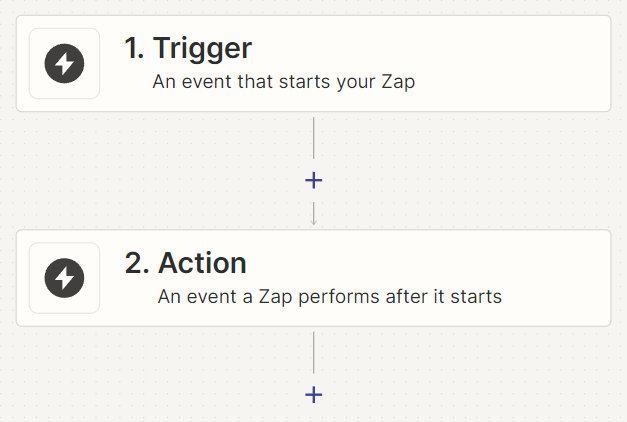
Trigger Event in App

Set up triggers in any Zapier-connected app to initiate document workflows.

Set Up the Action

Select recipients from a smart list or address book. Let them upload VOI and sensitive info securely, send a signing link, or request 2FA.

Automate and Relax

Once your Zap is set up, Zapier takes care of the rest. Your documents will be automatically sent for signing without any manual intervention.

how it work process
Testimonials

Say Goodbye to Paperwork. Boost Productivity with PleaseSign. Hear from Our Users

Quickly search hundreds of frequently asked questions or browse while you wait.
Posted on Google Google
Hany Berty profile picture
Hany Berty
Google star 1Google star 2Google star 3Google star 4Google star 5Trustindex verifies that the original source of the review is Google.
Great Customer service
Posted on Google Google
Big Sister Experience profile picture
Big Sister Experience
Google star 1Google star 2Google star 3Google star 4Google star 5Trustindex verifies that the original source of the review is Google.
PleaseSign was the solution we found when our business was in a growth phase, and we were losing track of what contracts had and had not been signed! The program is extremely easy to use, and allows for versatility with what elements you need personalised or included in each contract. We love that it has a template function also, and that we can file documents into different folders which means it's not only a great place to store contracts from our clients, but also a really simple way to manage HR issues within our own time such as Employment contracts and Handbook updates etc. The platform is extremely easy to navigate and when needed, the customer service team is always prompt, helpful and a real pleasure to deal with! This program allowed us to streamline our processes and get organised as our business grew!
Posted on Google Google
TNF Accountants profile picture
TNF Accountants
Google star 1Google star 2Google star 3Google star 4Google star 5Trustindex verifies that the original source of the review is Google.
Very good
Posted on Google Google
Ben Taylor profile picture
Ben Taylor
Google star 1Google star 2Google star 3Google star 4Google star 5Trustindex verifies that the original source of the review is Google.
Awesome team at PleaseSign. Great customer service! Would highly recommend.
Posted on Google Google
Melinda Walker profile picture
Melinda Walker
Google star 1Google star 2Google star 3Google star 4Google star 5Trustindex verifies that the original source of the review is Google.
I love this digital signing platform and love that I am supporting an Australian company. As a Buyers Agent, we send all our agreements via digital signing and PleaseSign make it so incredibly easy to use. Plus you actually get to speak to a real person who cares about their clients rather than never getting any service or attention like some of these larger digital signing platforms. Great value for money and I highly recommend PleaseSign to anyone looking to make their life and their business that much simpler while still receiving great service. Regards, Melinda Walker
Posted on Google Google
Evan Donnelly profile picture
Evan Donnelly
Google star 1Google star 2Google star 3Google star 4Google star 5Trustindex verifies that the original source of the review is Google.
I was having difficulty figuring out how to share a template I created with other staff. I called the company and before I could leave a voicemail I had another incoming call which helped me sort out the problem. It was one of the fastest issues I've had sorted out using online services. The help provided was very professional, friendly and useful.
Posted on Google Google
Robin Drury profile picture
Robin Drury
Google star 1Google star 2Google star 3Google star 4Google star 5Trustindex verifies that the original source of the review is Google.
We were so pleased to not only find a system that is easy to use but, it works well for our budget and, for us in Brisbane, it is great to use a local Brissie Business too. The guys seem to be genuinely interested in helping us out and, although I imagine we would be one of their smaller clients by volume, it is just a perfect fit for us. We also have a few more ideas on how we can use the system in future to help our clients with legal paperwork. I wouldn't hesitate to recommend to anyone looking for a better alternative to DocuSign or Adobe Sign (the service I was using). Thanks Guys, R
Posted on Google Google
loopche profile picture
loopche
Google star 1Google star 2Google star 3Google star 4Google star 5Trustindex verifies that the original source of the review is Google.
Great Company and Great People with great service....We have been using PleaseSign for a long while now - the product is simple and very easy to use and very cost effective - we love it - try it and you will see what we mean.....you won't be dissappointed. Louie Apostolovski Managing Director - itravel
Posted on Google Google
Reid Family profile picture
Reid Family
Google star 1Google star 2Google star 3Google star 4Google star 5Trustindex verifies that the original source of the review is Google.
We had a smooth transition from DocuSign to PleaseSign as we searched for a more budget-friendly alternative. Jamie provided exceptional support, guiding us through a clear demo, trial period, and pricing discussions. The team has found PleaseSign easy to use. I highly recommend PleaseSign to anyone in need of a signing platform; it's a great product with excellent customer service.

Integration Use Cases

Discover how businesses are using PleaseSign with Zapier to streamline their workflows.
agreement

Client Agreements

onboarding

HR Onboarding

contract

Sales Contracts

legal agreements

Legal Agreements

Ready to Streamline Signatures with Automation?

Trigger PleaseSign from any Zapier-connected app to save time and eliminate manual workflows.

Frequently Asked Questions

Zapier is an automation tool that connects your favourite apps to automate workflows. With the PleaseSign integration, you can automate the document signing process by creating “Zaps” that trigger actions in PleaseSign based on events in other apps.  For more information about contact support.

Yes, to connect PleaseSign with Zapier, you need to be on our Enterprise API plan. This plan provides the advanced features and capabilities required for seamless integration and automation. For more information about our API plan please contact support.

  • You can automate tasks such as sending contracts for signing when a new deal is closed in your CRM, sending new hire paperwork when a candidate is marked as hired, and storing signed documents in cloud storage when they are completed. The possibilites are endless.

To set up the integration, sign up for a PleaseSign account, connect your PleaseSign account with Zapier through the Zapier Integration page, and create your first Zap by following the step-by-step instructions provided.

You can integrate PleaseSign with over 7,000 apps available on Zapier, including popular tools like Salesforce, Trello, Google Drive, and more. This allows you to create custom workflows that fit your specific needs.

The number of Zaps you can create depends on your Zapier plan. Zapier offers various plans with different limits on the number of Zaps and tasks. PleaseSign itself does not impose any additional limits on the number of Zaps.

PleaseSign uses advanced encryption and security measures to protect your documents. The integration with Zapier follows strict security protocols to ensure that your data remains safe and compliant with Australian regulations.

Yes, our dedicated Australian based support team is available to assist you with any issues you encounter. You can contact us through our contact page or via email at support@pleasesign.com.au.

Common triggers include new lead additions, status changes in project management tools, and new entries in forms.

PleaseSign Actions include sending pre-configured templated docuements for signing straight from PleaseSign.

To upgrade to the Enterprise API plan, visit the PleaseSign pricing page or contact our Australian based support team. They will guide you through the upgrade process and ensure you have the necessary features for integration with Zapier. 

Scroll To Top